

Run your business
by talking to it.
Zooza MCP connects Claude to your account. Create classes, take attendance, look up anything — through a conversation.
Claude.ai · Claude Code · Claude Desktop · ChatGPT (coming soon)
What’s new
- Nineteen tools — class creation, attendance, search, terminology, messaging helper, and feedback reporting
- Attendance now understands parent/child classes — shows the child and the paying parent separately
- Business model validator — explore Zooza through a guided conversation before signing up, no account required
☆ Try these first
Conversation starters
Copy any prompt and paste it into your assistant to get going.
|
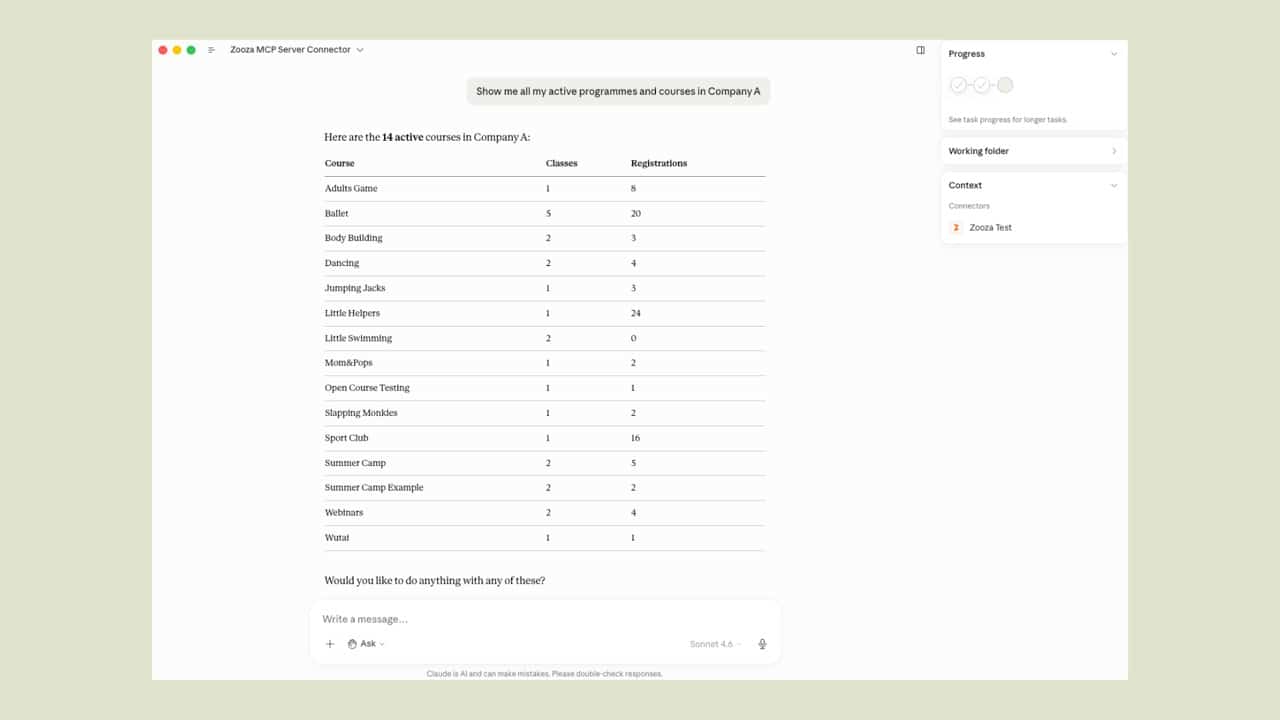
Quick start Show my programmes
Quick start Who am I, and what can you do?
Create a class Set up a Tuesday ballet class for ages 5–8 with Jane, starting next month for the autumn term.
Attendance Open the register for tomorrow’s 10:00 toddler swim class.
Find anything Show me all sessions for Emma this week.
Feedback Report a bug: the roster didn’t load this morning. Nineteen tools, one conversation
Grouped by what you actually want to get done — with the words you’d really use. 📅 Flagship · Guided, end-to-end The headline workflow. Claude interviews you, builds a full preview, and only writes once you confirm. It resolves the programme, venue and room, trainer, capacity, prices, billing period and payment templates — then expands recurrence and one-off dates into exact sessions, automatically skipping holidays. “Set up a Tuesday ballet class for ages 5–8 with Jane, starting next month for the autumn term.”
☑️ Registers & recaps Open the register for any session and mark each attendee — attended, no-show, cancelled, going or ignore — in one go. It understands children’s classes, showing both the child and the parent who pays. Finish with a public recap for parents or an internal note for staff. “Open the register for tomorrow’s 9:42 class.”
🔍 Natural-language lookup Turn “my next class”, “Sarah’s sessions this week” or “the swim course” into the right record. Search sessions and events by day, class, trainer or week; find courses by name, type or audience; look up venues with rooms and capacities; and pull eligible trainers and billing periods. “Find Sarah’s sessions this week.”
💬 Your vocabulary Teach it your words once — what you call programmes, classes, sessions and trainers — and it uses them in every future conversation. A built-in glossary and data-model explainer mean it never confuses a class with a programme, or a session with a booking. Works in Slovak, Czech, German, Hungarian, Romanian and English. “From now on, call our groups ‘kurzy’ and sessions ‘lekcie’.”
🏪 Multi-location If you run several companies or locations, it knows which ones you can access and works in the one you name — so the right roster, calendar and clients are always in view. “Show this week’s classes in the Bratislava studio.”
✉️ Messaging helper Look up every valid merge variable for your email, SMS and WhatsApp templates — like {first_name} or {class_name} — so personalised messages are built correctly the first time. “What merge variables can I use in a class reminder email?” — Helps you compose — sending isn’t available yet.
🐛 Feedback Hit a snag? Describe it in plain language and Claude drafts an anonymised report, shows it to you, and sends it to the Zooza engineering team only after you confirm. “Report a bug: the roster didn’t load this morning.”
⚡ Get connected No server to manage. No extra fees. Works with any active Zooza account. Step 1 Install the plugin or add the MCP server Download the plugin for Claude Code, or add the server URL in Claude.ai → Settings → Integrations. https://mcp.zooza.app/mcp Step 2 Sign in with your Zooza account OAuth flow — same login you already use on zooza.app. No new password required. Step 3 Talk to your studio Ask anything. Claude knows your programmes, instructors, and venues — and works in your language. Before anything is written to your account, Claude shows you exactly what will happen — sessions, dates, recurrences. You confirm. Then it saves. Every time. Schedule preview See the full list of sessions — dates, times, recurrences — before a single record is created. Confirm first Nothing is written until you say yes. Cancel at any step with no side effects. Controlled changes Only the tools that write data can write data. Lookups and previews are always read-only. We’d rather be honest about the edges than have you discover them mid-conversation. Send messages to clients It can look up merge variables and help you compose templates, but it cannot send emails, SMS or WhatsApp messages on your behalf. Process payments or create invoices Billing and payment actions aren’t available. Financial records remain managed in Zooza directly. Manage bookings or enrolments Viewing enrolment lists is available, but creating, moving or cancelling bookings isn’t yet. Pull analytics or financial reports Revenue summaries, occupancy stats, and payment history aren’t accessible through the assistant yet. Common questions before you connect. Do I need a paid Claude plan? Claude.ai free tier supports MCP integrations. Claude Pro gives you more messages per day, which matters if you use it heavily. Claude Code works with any plan. Is my Zooza data safe? The MCP server only accesses what your Zooza account can see. Connections use OAuth 2.1 — you can revoke access at any time from your Zooza settings. Which AI model works best? Claude Sonnet 4 handles everything well and is fast. Claude Opus is more thorough for complex class setups. See model comparison → What’s an MCP server? MCP (Model Context Protocol) is an open standard by Anthropic that lets AI assistants connect to real services. Think of it as a plugin that gives Claude live access to your account. No account needed A guided interview that maps how you run your business to Zooza’s features — useful for anyone exploring before they sign up. Works without logging in. “I run a small swim school. Would Zooza fit how we work?” Zooza MCP is included with every active Zooza plan. No extra fees. No server to manage. |
